

Acer Shell UI video demonstration
March 6, 2010 by admin
Filed under Uncategorized
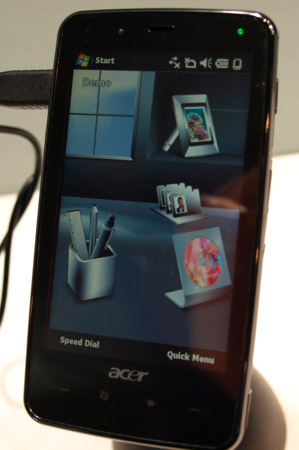 As part of Acer’s inaugural push into the smartphone space, the computer-maker turned mobile phone vendor used the Mobile World Congress world-stage to showcase their new Windows Mobile UI overlay, the widget-based Acer Shell UI.
The whole idea behind a Windows Mobile UI overlay is to give the customer a more intuitive and finger-friendly UI with which to interact with the Windows Mobile platform. Done right, a good WinMo UI obviates the need to access Windows Mobile’s decidedly less intuitive, menu-obsessed operating system. In that regard, the Acer Shell UI shines.
Keep in mind that HTC has been doing their TouchFLO 3D UI for a long time, and it’s almost an accepted fact that HTC’s WinMo overlay is the best in the business. Does the Acer Shell UI measure up? Almost.
The premise behind the Acer Shell UI is a virtual office space. You’re sat at your virtual desk, around which you arrange all sorts of typical desktop knick-knacks – things like picture frames, a Rolodex, a clock, etc. Each desktop item represents a widget application, allowing you to move about your virtual office and interacting with information sources like you would in your physical office. Unfortunately, the Acer Shell UI seems to lack the kind of system-wide integration that HTC has achieved with their TouchFLO 3D UI.
Take a look at the video demonstration for a closer look at the Acer Shell UI.

 Powered by
Comments
Tell us what you're thinking...
and oh, if you want a pic to show with your comment, go get a gravatar!